Retool pricing: A complete guide to plans in 2026

Retool costs $10 to $65 per builder per month, plus a lower rate for everyone who only uses (rather than builds) apps. On annual billing, the Team plan is $10 per builder and $5 per internal user, and the Business plan is $50 and $15. Enterprise pricing is custom, with a median contract of around $66,000 a year.
I tested Retool’s free plan, then a free trial of a paid tier, to understand how its pricing works in practice. Below are the plan prices and the usage charges on top. You’ll also find total cost estimates for teams of 50 and 500 people, as well as the billing rules that catch teams out. At the end, there’s a short comparison with an alternative like Softr.
[.blog-callout]
October 2026 update
We checked every number below against retool.com/pricing. This update adds Retool’s usage costs, Enterprise contract data, and real-world cost examples.
[.blog-callout]
Retool pricing at a glance
| Plan | Builder (annual / monthly) | Internal user (annual / monthly) | Included each month | What to know |
|---|---|---|---|---|
| Free | $0 | $0 | • 500 workflow runs • 250 AI credits |
Up to five users in total. No external users, and you can’t buy more of anything. |
| Team | $10 / $12 | $5 / $7 | • 5,000 workflow runs • 1,000 AI credits |
More than five users and a staging environment. Still no external users. |
| Business | $50 / $65 | $15 / $18 | • 5,000 workflow runs • 3,000 AI credits |
External users (first 50 free), permissions, audit logs, and custom branding. |
| Enterprise | Custom | Custom | Custom | SSO, SCIM, Git source control, usage analytics, and self-hosting. No public price. |
How Retool’s pricing works
First, Retool charges per user, not per app. You can build unlimited apps on every plan. Retool splits users into three types, each priced differently: builder, internal user, and external user.
A builder is someone who built or edited an app or workflow during the billing cycle. An internal user is someone in your organization who only used the apps that cycle, which is why they’re billed lower than builders. An external user is someone outside your organization, like a client or vendor, and they’re only available to add on the Business and Enterprise plans.
Then there are AI credits. There’s no limit on how many apps you can build, but the AI credits you use to build them can run out. Every plan comes with a monthly pool, and every app you generate or edit with AI reduces it. Retool estimates a typical app at 3 to 6 prompts and about 12 credits per prompt, but that assumes you know exactly what you’re building.
Workflow runs and agent hours follow the same pattern, with monthly allowances and extra charges once you exceed them. So on top of paying per seat for every person, you also pay based on how much you build and run.
How fast Retool AI credits run out
When I tried building an app myself, my first prompt cost 11 credits and the second cost 18. That’s almost 30 credits on one unfinished app, and it’s easy to see how a few sessions of experimenting would rapidly eat through a monthly pool. Complex prompts cost more, and once you’re out of credits you can’t use the AI features until the next month (unless you buy more).
Retool pricing breakdown
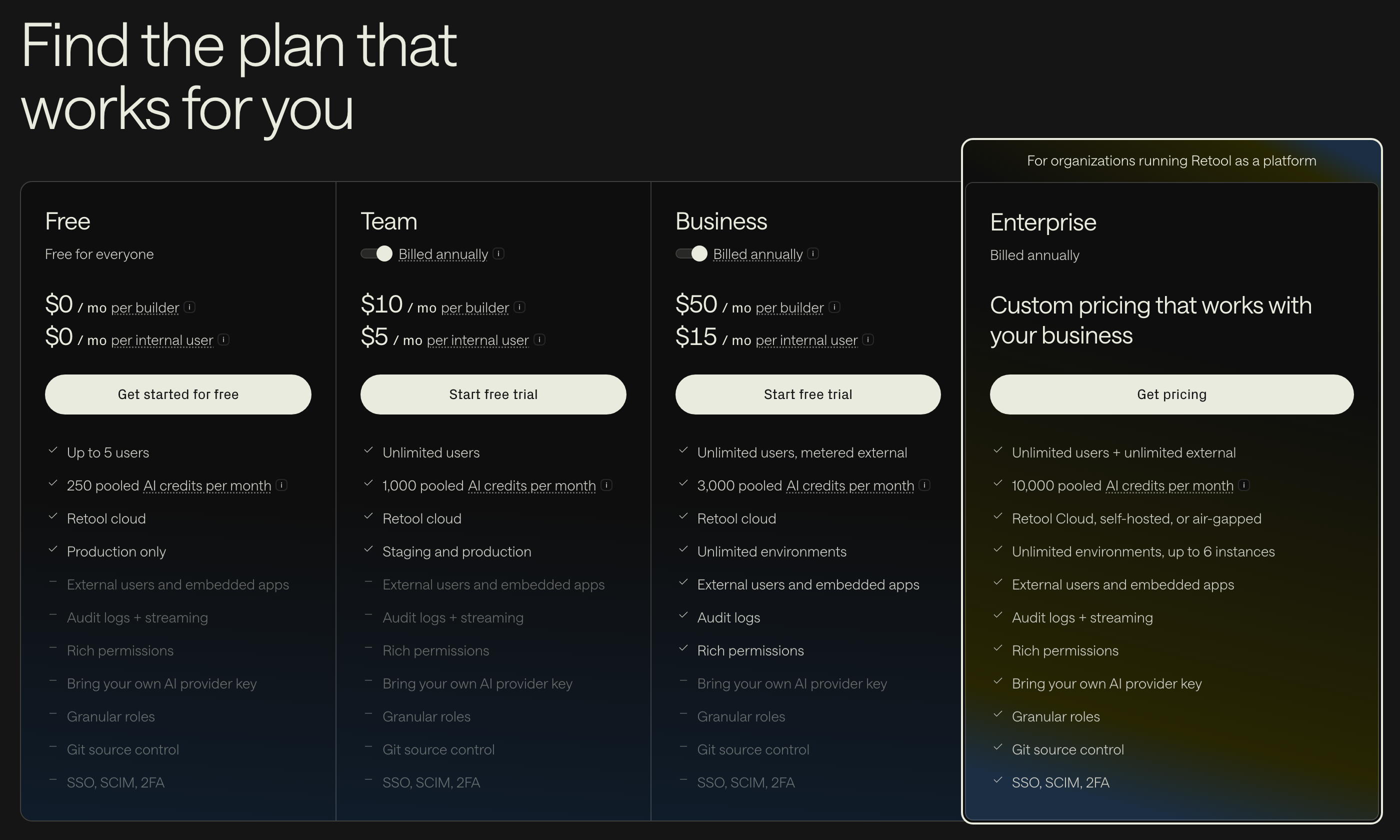
The prices below are for annual billing on Retool Cloud. Monthly billing costs more: $12 instead of $10 per builder on Team, and $65 instead of $50 on Business.
Free: $0/month
The Free plan is Retool’s entry point. It’s the only plan that doesn’t charge extra for additional users (though there’s a limit on how many you get), and it offers a decent set of features to test the tool and decide if it’s for you. The catch is that you can’t buy extra AI credits, users, or agent hours on this plan.
Best for: Solo builders or developers who want to explore the tool before buying.
Key features
- Unlimited web and mobile apps
- 250 AI credits a month with no option to buy extra
- Up to 5 users total, with no option to add more
- 500 workflow runs a month
- Up to 20 agent hours a month
- 5GB database capacity and 5GB file storage
Pros
- It’s free with no time limit, so you can test Retool at your own pace
- You can build as many apps as you want and see what the tool actually does
- You get enough credits and features to build something real, not just click around a demo
Limitations
- 250 AI credits can finish quite fast, especially if you’re building complex apps
- If you have a team, the 5-user limit might not be enough
- No external users, so you can’t create customer-facing apps, only internal apps
- You can’t buy more AI credits, users, or agent hours
- No staging environment, so there’s no separate space to test changes before they go live
My verdict: It’s a good starting point to see whether Retool fits your needs. But between the 5-user limit and 250 credits, you’ll run out faster than you’d expect, especially if you’re experimenting. For ongoing work with a full team and external users, you might need to upgrade.
Team: $10 per builder, $5 per internal user per month
The Team plan is Retool’s first paid tier, and it’s where you can start adding more than 5 users and buy extra credits and agent hours when you run out. You pay per user, split between builders and internal users, so your total Retool cost depends on how you structure your team.
Best for: Growing teams that have outgrown Free and need more users, higher limits, and a staging environment.
Key features
- More than 5 users
- 1,000 AI credits (750 + 250 bonus) a month, with the option to buy more
- 5,000 workflow runs a month
- Extra agent hours billed hourly
- A staging resource environment
- Environmental configuration variables
Pros
- Since users cost less than builders, you can keep your bill down by giving build access only to the people who need it
- There’s no user cap, so you can bring on more team members without having to upgrade
- You can top up AI credits and agent hours when you hit a limit, so work doesn’t stall
- The staging environment lets you test changes safely before they reach real users
- You can choose which model to use for agents, and switch between models through the month
Limitations
- Still no external users, so you can’t build customer-facing apps
- Costs can add up as you add builders and internal users until it becomes too expensive
- No permission controls or audit logs, so you can’t stop a user from editing and becoming a builder
- Extra agent costs vary by model, and some models are more expensive than others, driving the cost up
My verdict: Team works well for a group who need more users and limits. You get more AI credits than Free, and you can decide who builds and who only uses the apps. But if you’re building just a few apps or have fewer than five teammates, the jump from Free may not be worth it yet.
Business: $50 per builder, $15 per internal user per month
If you’ve been looking for the Retool pricing plan that lets you bring on external users, this is it. You get 50 free external users per month, and pay for the rest. You also get more control with access permissions, audit logs, and custom branding. All of it comes at a cost, though, since the per-builder and per-user price jumps sharply from Team.
Best for: Larger teams that want more control and need to invite external users
Key features
- External users, with the first 50 free, then billed by volume
- 3,000 AI credits (1,500 + 1,500 bonus) a month, with the option to buy more
- Portals and embedded apps
- Granular permission controls and audit logs
- Custom branding
- Unlimited resource environments and modules
- Limited access to platform APIs
- Offline mode and push notifications for mobile apps
Pros
- You can reach people outside your company, so client portals and customer dashboards become possible
- You decide exactly who can see, edit, and manage each app, which protects sensitive data as more people get access
- You can see who did what and when, so mistakes are easier to trace
- The bigger credit pool means you can build more without worrying about using too much credit or topping up
Limitations
- The per-builder and internal-user price increase from Team to Business is significant
- External users cost extra once you pass the first 50, and that adds up fast with a large user base
- Still no SSO or source control, both are locked to Enterprise
- No dedicated support, you’re still on community and standard help
My verdict: Business has almost everything you’d want for building apps. But it’s a big step up in price, especially per builder and internal user. So unless you’re building for customers or need proper access controls, it might not be worth it. If you just want to build internal tools for a small team, Team does the job for far less.
Enterprise: Custom pricing
Enterprise is Retool’s plan for large organizations, and it’s the only tier with self-hosting and other advanced features. Pricing isn’t public, so you have to talk to their sales team for a quote. The Enterprise pricing section below shows what companies actually pay.
Best for: Large organizations that need advanced security and dedicated support or self-hosting
Key features
- Everything in Business, plus SSO through SAML or OpenID Connect
- SCIM, so accounts are created and removed automatically from your company directory
- Self-hosting, so you can run Retool on your own infrastructure
- Source control, so you can manage app changes through Git
- AI credits set in your contract, plus the option to use your own model API key
- Full white-labeling and independent workspaces
- Biometric authentication so you can protect access to apps
- Usage analytics across all apps and users, and a connection to analytics vendors like Segment and Google Analytics
- Full access to all Platform API scopes, for managing Retool programmatically
Pros
- You get bulk discounts and per-use-case pricing
- Your team can sign in with your existing company login, so access is easier to manage as headcount grows
- You can self-host, which keeps sensitive data in your control
- You get a dedicated support relationship, so problems get handled faster
Limitations
- Retool Enterprise pricing isn’t public, so you can’t budget or compare without going through sales
- Features many teams consider basic, like SSO, are locked behind this top tier
- You’ll likely need technical help to integrate systems and set it up properly
My verdict: Enterprise is worth it if you’re a large organization with heavy usage and strict security needs, you want to self-host, and price isn’t your main concern. You get premium support and plenty of room to customize. For everyone else, it’s too expensive to justify.
Retool usage and add-on costs
Remember: seats are only part of the bill. External users, workflow runs, AI credits, and agents each have their own pricing.
External user pricing
External users are only available on Business and Enterprise. On Business, the first 50 external users are free each month. Above that, the tiers are graduated, and each rate applies to the users inside that band.
| External users | Annual billing (per user, per month) | Monthly billing (per user, per month) |
|---|---|---|
| 1 to 50 | Free | Free |
| 51 to 250 | $8 | $10 |
| 251 to 500 | $6 | $7 |
| 501 and above | $4 | $5 |
Retool gives the following example: 510 external users on an annual Business plan cost $3,140 a month. That’s 200 users at $8, 250 at $6, and 10 at $4. On Enterprise, external user pricing has to be negotiated with sales.
Workflow runs
The free plan includes 500 workflow runs a month, while Team and Business include 5,000. A run only counts when a workflow is triggered automatically and completes successfully. Failed runs and manual test runs from the workflow editor are free.
Past your limit, Retool bills extra runs automatically. The rate isn’t on the pricing page, but Retool staff have confirmed it on the community forum: extra runs cost $75 per block of 5,000. One customer’s receipt shows that a block is billed in full, even when you go only 500 runs over. Those posts are from 2024 and 2025, so the rate may have changed since. Check with Retool before you budget for heavy workflow use.
AI credits
AI credits cover app building with AI and AI queries. Free includes 250 a month, Team includes 1,000 (750 plus 250 bonus credits), and Business includes 3,000 (1,500 plus 1,500 bonus). Retool says the bonus credits may change over time, so budget on the base amount.
Credits don’t roll over, and the Free plan gets no top-ups. On Team and Business, extra packs cost $100 per 1,000 credits. Enterprise customers can use their own model API key, so AI calls don’t draw from the pool at all.
Also, if you build from an external AI tool through Retool’s MCP server (like Claude Code), it still consumes Retool credits (on top of whatever your external AI costs).
Retool Agents pricing
Retool Agents are AI workers that complete multi-step tasks on their own. They’re billed by the hour and don’t use AI credits. Every organization gets $50 of free agent usage a month, which covers up to about 20 hours depending on the model.
After that, the hourly rate depends on the model. Retool’s rate card starts at $1 an hour for the cheapest OpenAI model. Claude Sonnet models cost $61 an hour, and the most expensive model costs $175. If you bring your own model API key, Retool charges a flat $5 an hour, and you pay your model provider separately.
Hours can add up quickly. An agent on a $61-an-hour model that runs two hours every working day uses about 44 hours a month. That amounts to ~$2,630 a month after the free $50 pool is expended. (Note: Agent overages are invoiced monthly, even on annual plans.)
Retool Enterprise pricing
Retool doesn’t publish Enterprise prices, but contract data gives a realistic range. According to Vendr, the median Retool contract is about $66,000/year. Based on 159 purchases, Vendr’s low and high estimates are $24,800 and $152,800 a year.
Reddit users share the same picture. One team on r/Retool said they were quoted a $60,000 base fee, plus $100 a month per editor and $25 a month per viewer. After negotiating, the deal came to about $50,000 a year, and the team decided to move off Retool. Another user said the quote for fewer than 10 users was already in the five figures.
For a large team, Enterprise isn’t always the most expensive option. Five hundred users on the Business plan cost about $100,500 a year at list price (see the examples below). That’s above Vendr’s median, so a negotiated Enterprise contract can cost less than a "maxed-out" Business bill, while adding extra features like SSO and SCIM.
Enterprise contracts usually go lower with these levers:
- A multi-year term
- Paying annually up front
- A higher committed number of builders and users
- Quotes from alternatives during the negotiation
Can you still self-host Retool?
Yes, but only on the Enterprise plan. Since February 2026, new self-hosted deployments go through Retool’s Enterprise sales team. Before that, teams could also self-host on Retool’s self-serve plans.
Self-hosting also costs more than the license. You run the servers and the database, apply upgrades and security patches, and fix outages yourself. That requires engineering time every month, so add it to the Enterprise price when you compare options.
If self-hosting on a smaller budget is the requirement, open-source tools like Appsmith, ToolJet, and Budibase still offer it. Our Retool vs Appsmith comparison covers the closest alternative.
What Retool costs in practice
Per-seat prices are hard to picture, so here are three common team sizes. The totals use Retool’s list prices and cover seats only, before workflow, AI credit, and agent overages.
| Team | Plan | Annual billing (per year) | Monthly billing (per year) |
|---|---|---|---|
| 50 people: 10 builders + 40 internal users | Team | $3,600 | $4,800 |
| 50 people: 10 builders + 40 internal users | Business | $13,200 | $16,440 |
| 500 people: 25 builders + 475 internal users | Business | $100,500 | $122,100 |
| Customer portal: 5 builders + 10 internal users + 400 external users | Business | $34,800 | $42,660 |
50-person team: Team is cheap at $3,600 a year, but it has no permission controls or audit logs. If you need either one, the same team costs $13,200 a year on Business, about 3.7 times as much.
500-person company: Most of the cost is internal users, because 475 people at $15 is $7,125 a month. A company this size usually needs SSO too, which means Enterprise. That’s why Vendr’s $66,000 median can come in below the Business list price.
Customer portal: The 400 external users cost $2,500 a month, which is 86% of the bill. For a portal, your customer count drives the price.
Retool licensing traps to watch for
If your Retool bill ends up being higher than you budgeted for, these are some of the likely reasons why:
- Any edit makes someone a builder: If a person edits one app or workflow during a billing cycle, they’re billed at the builder rate for that month. On Business and Enterprise, you can limit edit rights with permission groups. Team has no way to stop it.
- View-only users still pay: Everyone in your organization who logs in is billed as an internal user, at $5 to $18 a month. Only external users on Business get a free allowance.
- Permissions and audit logs need Business: To control who edits what, or to see who did what, you jump from $10 to a whopping $50 per builder.
- SSO, SCIM, and Git need Enterprise: Company login, automatic account removal, and version control for app code are not available on any self-serve plan.
- Annual seats only go up: You can add seats to an annual plan, but you can’t remove them. Users above your commitment are billed at the monthly rate, and canceling early does not get you a prorated refund.
- Usage bills monthly, even on annual plans: Extra workflow runs and agent hours show up on a monthly invoice, on top of the annual payment.
Retool pricing: What users are saying on Reddit
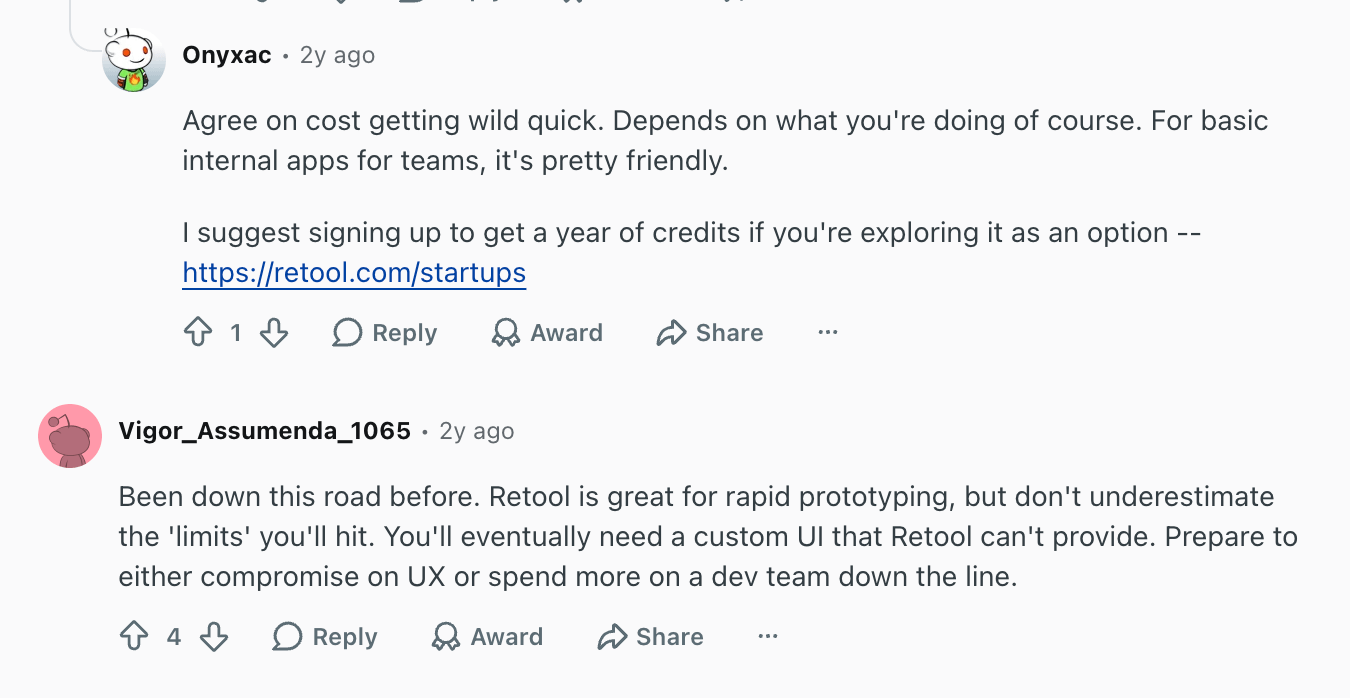
Users often talk about how Retool starts off being affordable, then gets expensive fast. It’s far easier than you think to work through all your credits. One Reddit user shared that their bill went up 20x, and their leadership had to pull the plug. Another said the cost was so high it became cheaper to pay full-time staff to build the UIs themselves.
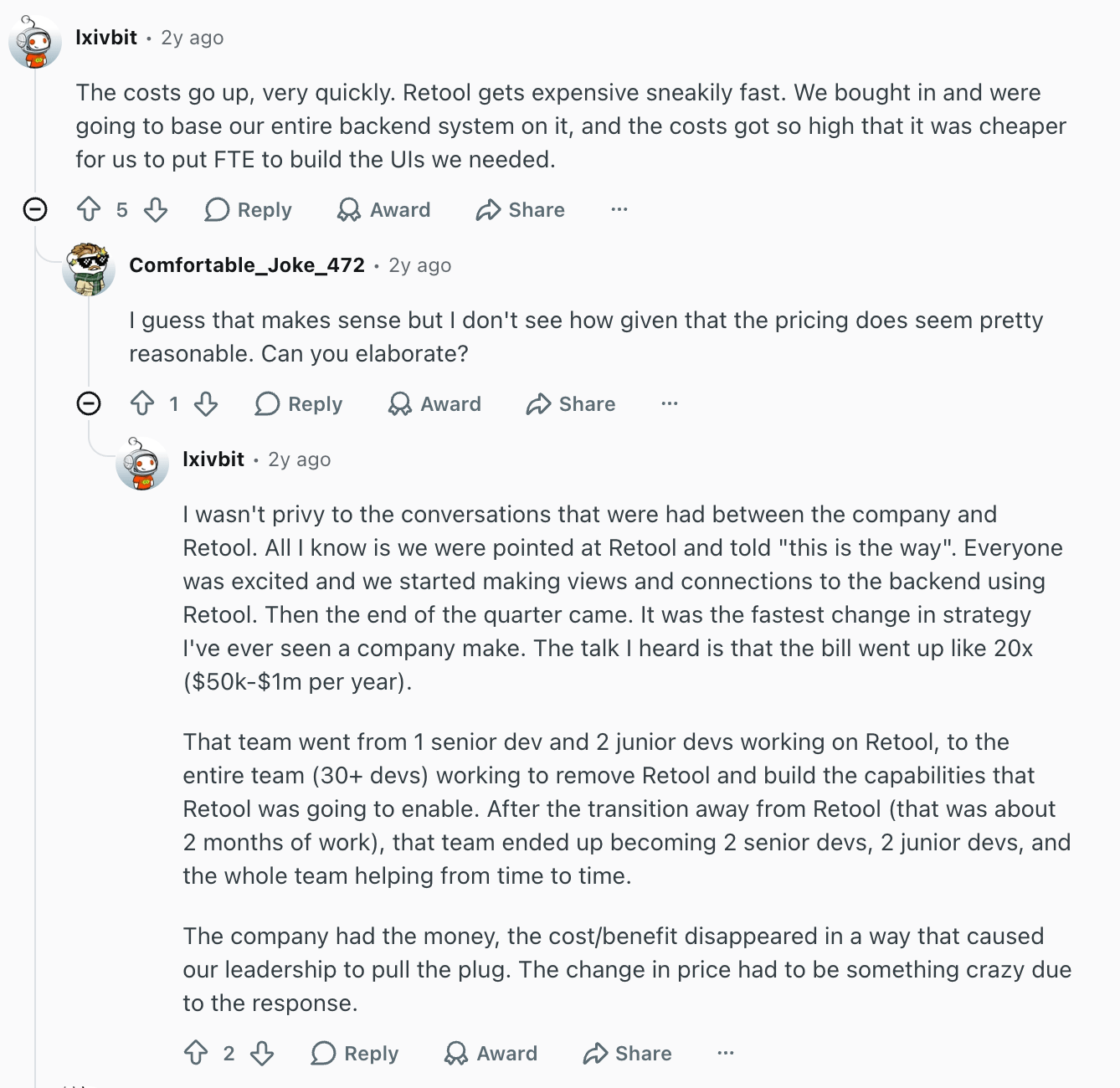
The feedback isn’t all negative, though. Several others point out that for basic internal apps or rapid prototyping, Retool is reasonably priced and does the job well. The issue only comes when you start building more complex apps and bringing on tons of internal and external users.
Which Retool pricing plan should you choose?
Choose Free if you’re a solo builder or a small team of up to five, and you mostly want to test Retool and build a few internal tools. It costs nothing, so it’s the natural place to start before you pay for anything.
Choose Team if you’ve outgrown the five-user limit, need more AI credits, or you need a staging environment. It’s a reasonable step up, and if most of your people only use the apps rather than build them, you can keep costs even lower.
Choose Business if you need to build apps for clients or customers, or you need permission controls and audit logs. It’s a big jump in price, so I’d recommend choosing it only if you need those features.
Choose Enterprise if you’re a large organization that needs dedicated support, SSO, self-hosting, or source control. Vendr’s low and high estimates for a contract are about $25,000 and $150,000 a year, so budget within that range.
Is Retool worth it?
Retool is worth it if you’re a small team building simple internal apps. But once you start scaling, building apps with portals and external users, or needing features like permission controls, audit logs, white-labeling, source control, and self-hosting, the costs rise fast, and it might no longer be worth it.
Consider Retool if you:
- Have a small team building straightforward internal tools, not customer-facing apps
- Are comfortable with JavaScript and SQL for the more advanced parts
- Want unlimited apps and don’t mind usage-based pricing for AI, agents, and workflows as you scale
- Have a stable team so the per-user cost stays predictable
- Need enterprise controls like SSO, source control, or self-hosting and have the budget for it
Pass on Retool if you:
- Are non-technical and want to build and maintain apps without code
- Are watching your budget, since per-user seats, AI credits, and usage charges add up fast as you grow
- Need customer-facing apps, which require the Business plan plus external user fees on top
- Want to self-host without paying for an Enterprise contract
If you’re in the second group, our list of Retool alternatives compares the main options.
Retool vs Softr pricing: Which is better?
Both tools charge for builders and app users, but Softr includes them in a flat plan price and charges far less for extra seats. Here’s how the two compare.
| Retool | Softr | |
|---|---|---|
| Paid plans | $10 to $65 per builder, plus $5 to $18 per internal user, each month | $19, $99, or $329 a month, with builders and app users included |
| Extra builder | $10 to $65 a month | $5 to $20 a month |
| Internal app users | Every user is billed, even view-only | Workspace members use apps for free. Extra app users start at $1 a month |
| External or client users | Business plan and up. First 50 free, then $4 to $10 each | Included on every paid plan |
| SSO and audit logs | Enterprise | Enterprise |
| SOC 2 Type II report | Yes, through its trust center | Yes, through its trust center on request |
| Skills needed | JavaScript and SQL for advanced logic | No code. Build with Softr AI or the visual editor |
| Building from Claude, ChatGPT, or Cursor (MCP) | Uses Retool AI credits, on top of what your AI tool costs | Uses no Softr AI credits. Softr MCP is included on every plan, including Free |
Is your team non-technical, or are most of your users clients? Then compare the totals on Softr pricing before you sign a per-seat contract.
When you're ready to get started, try Softr for free and build your first business app with AI.
Frequently asked questions
How much does Retool cost per user?
Can you still self-host Retool?
Why is Retool so expensive?
What are Retool’s competitors?
How much do Retool Agents cost?