Replit pricing: A complete guide to plans and credits in 2026


A few weeks ago, I tried building a project management tool in Replit on the Starter plan. The Agent spun up a prototype fast, but my daily credits ran out in under two hours after a few rounds of changes.
Running out that quickly—and having to wait until the next day to keep troubleshooting the app—made me look into how Replit's free daily Agent credits actually work. I found thread after thread of people asking the same questions: Why do credits run out so fast? What counts as usage? Why is Replit's pricing so hard to predict?
So I pulled together this guide for anyone who’s hit the same wall. Below, I’ll break down Replit’s current pricing, how billing works, which plan fits which type of user, what people are saying on Reddit, and how to manage usage.
Replit pricing at a glance
How Replit's effort-based billing works
Replit's pricing runs on credits, charged through a model it calls effort-based billing. Almost everything you do draws from your available credits, including building with Replit Agent, publishing apps, and running databases.
On the free Starter plan, you get Agent credits that refresh daily. Paid plans come with monthly credits instead, starting from $20 worth. If they run out, you can either buy a credit pack or keep building on pay-as-you-go.
What is Free Mode? It’s Replit’s no-cost Agent mode, available on every plan. On Core and Pro, everyday Agent work in Free Mode doesn’t use your credits until you reach the plan’s allowance. For harder tasks, you switch to Power Mode or Max Mode, which do spend credits.
What is effort-based billing? It means Replit charges you based on how much work the Agent actually does to fulfill a request, not a flat rate per message. Each request becomes a single checkpoint—Replit's saved record of the completed work—and that checkpoint is what you pay for. The harder your request, the more credits the Agent uses. Asking the Agent to fix a small layout issue, for example, costs far less than asking it to build a login flow, connect a database, and debug the whole thing.
What does pay-as-you-go mean? Once you exhaust your included credits, Replit keeps working and simply charges your card for any extra usage. It's convenient, but there's no automatic stop unless you set a spending limit yourself.
The tricky part with effort-based billing is that you don’t always know how many credits a task will cost until the work is already done. Replit (not you) decides how much effort it’ll take to fulfill your request. So a vague edit request like “improve the UI” can cost far more than asking the Agent to “add a sort button to the table.” Replit does ask you to confirm before paid work starts, but the confirmation doesn’t tell you the final cost.
Now, let's break down each plan and look at where they make sense for your use case.
Replit AI pricing breakdown
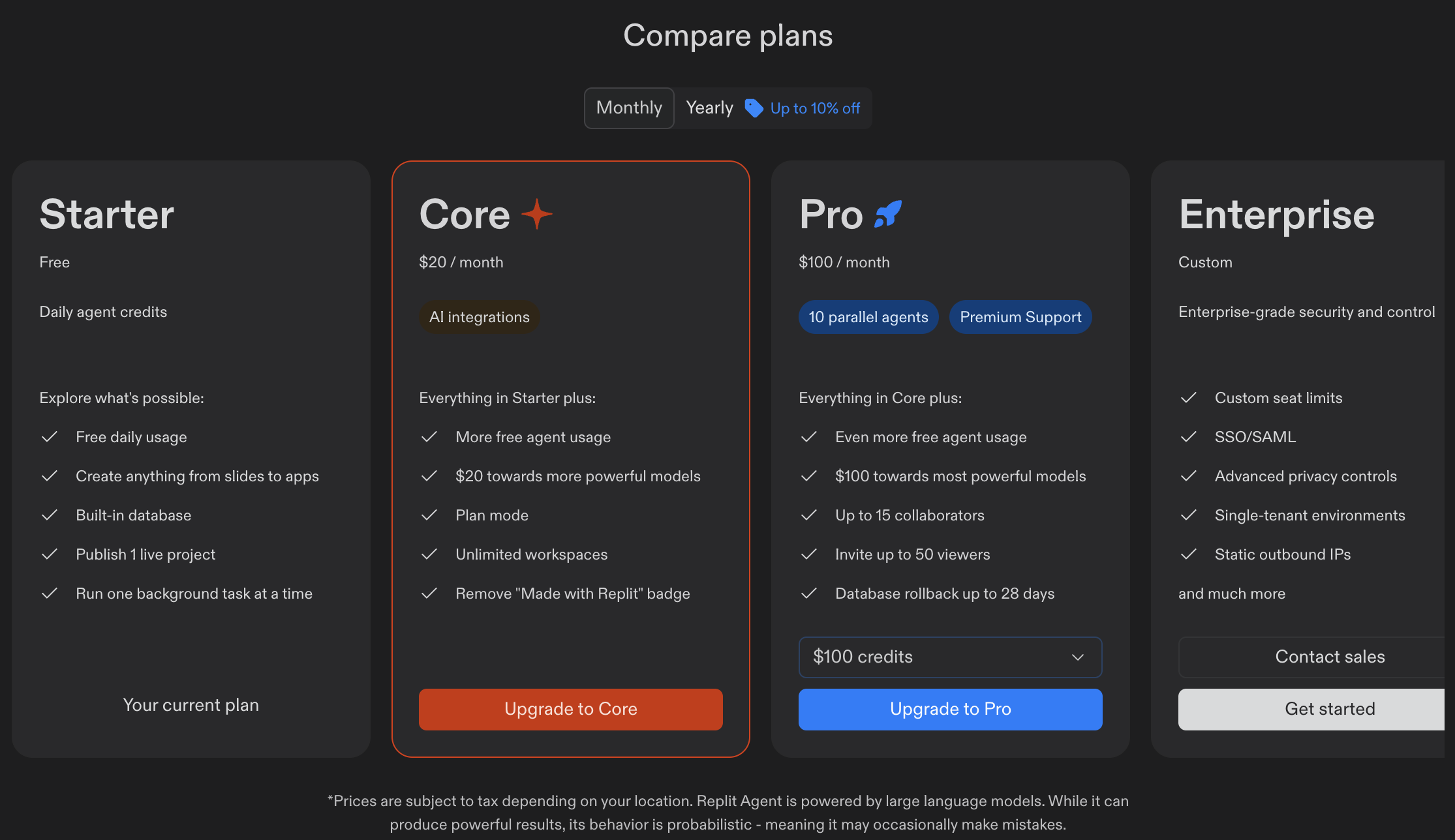
Starter: $0/month
Starter is Replit’s free plan. While it no longer appears on Replit’s public pricing page, it is still available. It gives you:
- Daily Agent credits, up to a monthly cap
- Separate free monthly credits for databases, object storage, and publishing
- One published app, with a link that automatically expires after 30 days
- A built-in database for full-stack apps and 2GB of workspace storage
- Free Mode and Agent chat, both with a daily cap
- Projects of any type, from slides to apps
- One background task at a time
- Design Canvas and Visual Editor
- Private or password-protected deployments
Note: Replit doesn't publicly state the exact daily dollar amount for Starter Agent credits. So while the credits reset each day up to a monthly cap, it's hard to know upfront how far the free plan will actually take you.
Pros
- Lets you try Replit Agent without adding a credit card
- Works in the browser, so there’s no local dev environment to set up
- Includes 1 free published app, so you can quickly share a working demo
Cons
- Daily credits run out fast once you start asking for changes
- No Full build, Plan Mode, or Connectors, so the Agent is limited to smaller builds
- You have to wait for the next daily reset or upgrade when credits run out
- No usage dashboard or budget controls to track how many credits you use
- Apps that need to run continuously will need a paid deployment type
Best for: Anyone who wants to try Replit Agent or test a quick idea before paying.
My verdict: Starter is basically a free trial with no time limit. It's enough to test Replit, build a quick prototype, and understand how the Agent works. But the daily credit cap is a hard ceiling, and you'll likely hit it mid-build.
Replit Core: $20/month, or $18/month billed annually
The Core plan gives you more room to plan, build, and publish full-stack apps with monthly credit limits. This plan gives you everything included in the free plan, plus:
- $20 in monthly credits
- A Free Mode allowance for everyday Agent work, up to 30 hours of chat
- Plan Mode for mapping out work before you build
- Full build, so Agent can work independently on larger tasks
- Power Mode and Max Mode when you need stronger models
- Third-party connectors (Google, Stripe, etc.) and Replit AI Integrations
- Unlimited published apps, with logging, analytics, and no Replit badge
- Invite up to 5 builders to your Workspace
- Shared Kanban board for planning and tracking work
- A 7-day window to restore a deleted database
- 1 active background task at a time
Note: Your credits aren't only for building with the Agent. A published app using cloud resources—hosting, storage, network transfer—draws from the same credits.
Pros
- Gives you monthly credits instead of a daily Agent cap
- Unlocks Full build, Plan Mode, and Connectors, which makes Core much more useful than Starter
- Free Mode covers everyday Agent work without touching your $20 in credits
- Lets you publish unlimited apps and remove the “Made with Replit” badge
- Gives you access to usage tracking and the ability to set spending limits
Cons
- You can burn through the $20 monthly credit in a day of heavy building or debugging in Power or Max Mode, which makes costs hard to predict
- Credits don’t roll over; they disappear at the end of the billing cycle
- Debugging can get expensive: if the Agent makes a mistake, tries to fix it, fails, and takes another paid attempt, each try still costs credits
- Parallel work is limited: you get 1 background task at a time, so small teams may still have to wait their turn
Best for: Solo developers, freelancers, and small teams of up to 5 who want full Agent access to build and publish prototypes and smaller apps.
My verdict: Core gives you enough to build, publish, and share apps without a full engineering setup. But the $20 credit allowance can disappear fast once you're making changes, fixing bugs, or debugging — or once your published app starts pulling more cloud resources. If that sounds like your workflow, plan to either top up with credit packs or keep a close eye on the pay-as-you-go meter.
Replit Pro: $100/month, or $90/month billed annually
Replit Pro is for teams building full-stack apps with the platform. Instead of constantly working around Core’s limits, you get more room to build, test, fix, and ship faster. Pro is also tiered. The base tier costs $100/month for $100 in credits. Higher tiers cost $225 for $250 in credits, $440 for $500, $850 for $1,000, and $2,050 for $2,500 (monthly billing). You get everything in the Core plan, plus:
- $100 or more in monthly credits, depending on your tier
- Up to 15 collaborators and 50 viewers
- Work in parallel with up to 10 agents
- Access to Replit’s most powerful models
- Database rollbacks for up to 28 days
- Two-month credit rollover for unused credits
- Priority customer support
- Role-based access
- More Free Mode usage than Core
Pros
- Unused credits roll over for two months
- Lets your team run up to 10 agents at the same time, so people can work on different parts of the app without waiting as much
- A larger Free Mode allowance, so more everyday work stays off your credit balance
Cons
- The price jump from Core's $20 to Pro's $100 is steep, especially for solo builders or casual projects
- $100 in credits still isn't unlimited; Max Mode and running several agents can burn through it fast
- Effort-based billing makes costs hard to predict, so the same $100 pool can stretch very differently from one project to the next
- On a busy team, your credits can drain without an easy way to see who spent what
Best for: Small teams and agencies that have outgrown Core and need more credits, more collaborators, and faster Agent work.
My verdict: Pro is the plan for teams that need Replit to move faster. For solo users, it’s probably too expensive. But for small teams or agencies building real apps for customers, it gives you far more room to work than Core. If your team needs more than the included $100, you can pick a higher credit tier, but you still need to watch your credit spend.
Replit Enterprise: Custom pricing
Replit Enterprise is best for organizations that need stronger security, governance, privacy controls, and support. The plan gives you everything in Pro, plus:
- SAML Single Sign-On (SSO) and SCIM provisioning
- Unlimited seats with no per-seat fees
- Advanced privacy controls
- Admin governance controls, like requiring private deployments
- Data warehouse integrations, including Databricks, BigQuery, and Snowflake
- Custom support and deployment options
- Audit logs
Pros
- Brings the security and governance controls IT teams usually require before approving a tool company-wide
- Fits how big companies actually buy: custom contracts and invoice billing
- Offers stronger deployment and infrastructure controls for companies with stricter data or network requirements
Cons
- Effort-based billing still applies
- No public pricing, so you can’t compare costs before you start the upgrade or talk to sales
- Final costs depend on seats, usage, deployment needs, and contract terms
- Setup may take longer because IT, security, finance, and procurement teams usually need to review it before rollout
Best for: Larger companies, internal teams, and agencies building for enterprise clients that need SSO, audit logs, and stronger governance around company data.
My verdict: Enterprise is where Replit's governance and security features finally show up. But the lack of public pricing makes it hard to evaluate up front, and the effort-based credit model doesn't go away. If you don't have a specific compliance or governance requirement, Pro will serve you better for less.
Replit pricing: What users are saying on Reddit
On Reddit, many are frustrated by how unpredictable Agent costs have become, especially since the shift to effort-based billing.
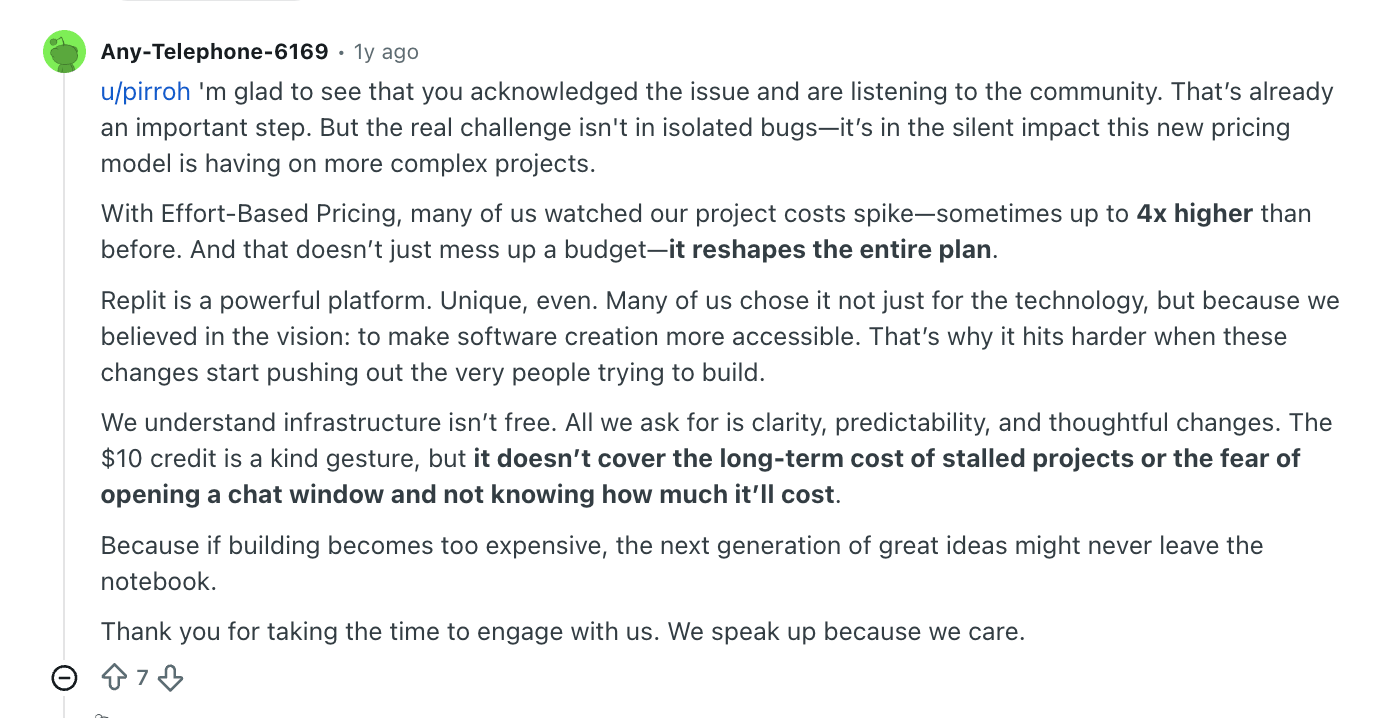
In the thread where Replit explained its move to effort-based pricing, one user said some projects had become "up to 4x higher" than before. Others had the same concern: they couldn’t tell what a build session would cost.
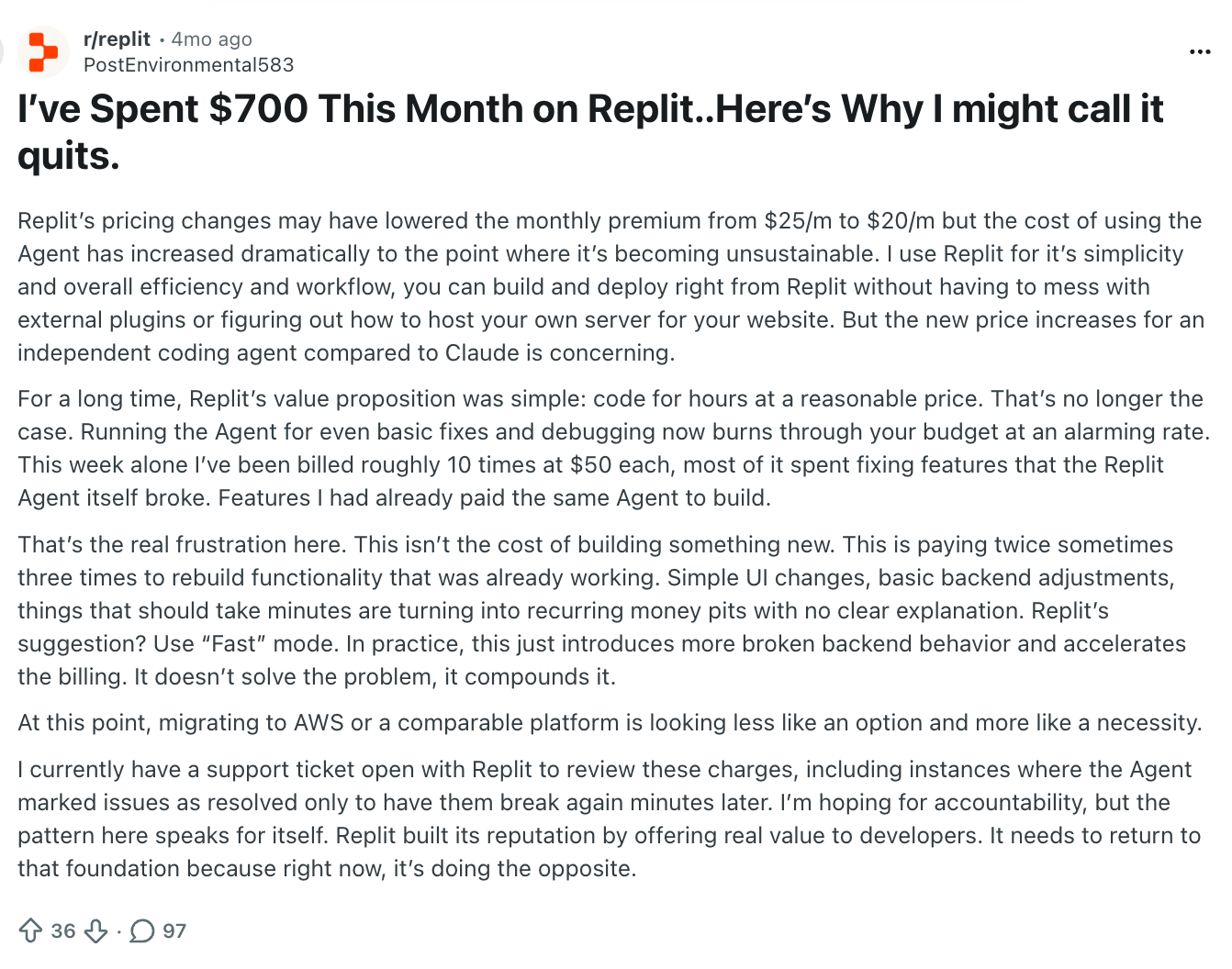
Another recurring complaint is paying for every re-prompt. Over and over, several users spend credits to build a feature, then spend more credits when Agent breaks something or fails to fix the issue. One user said they'd spent about $700 in a month, much of it on fixing things the Agent had broken (things they'd already paid it to build).
Another user in this thread said Replit charged them $1,982 in 24 days on a pre-launch app with no users or revenue.
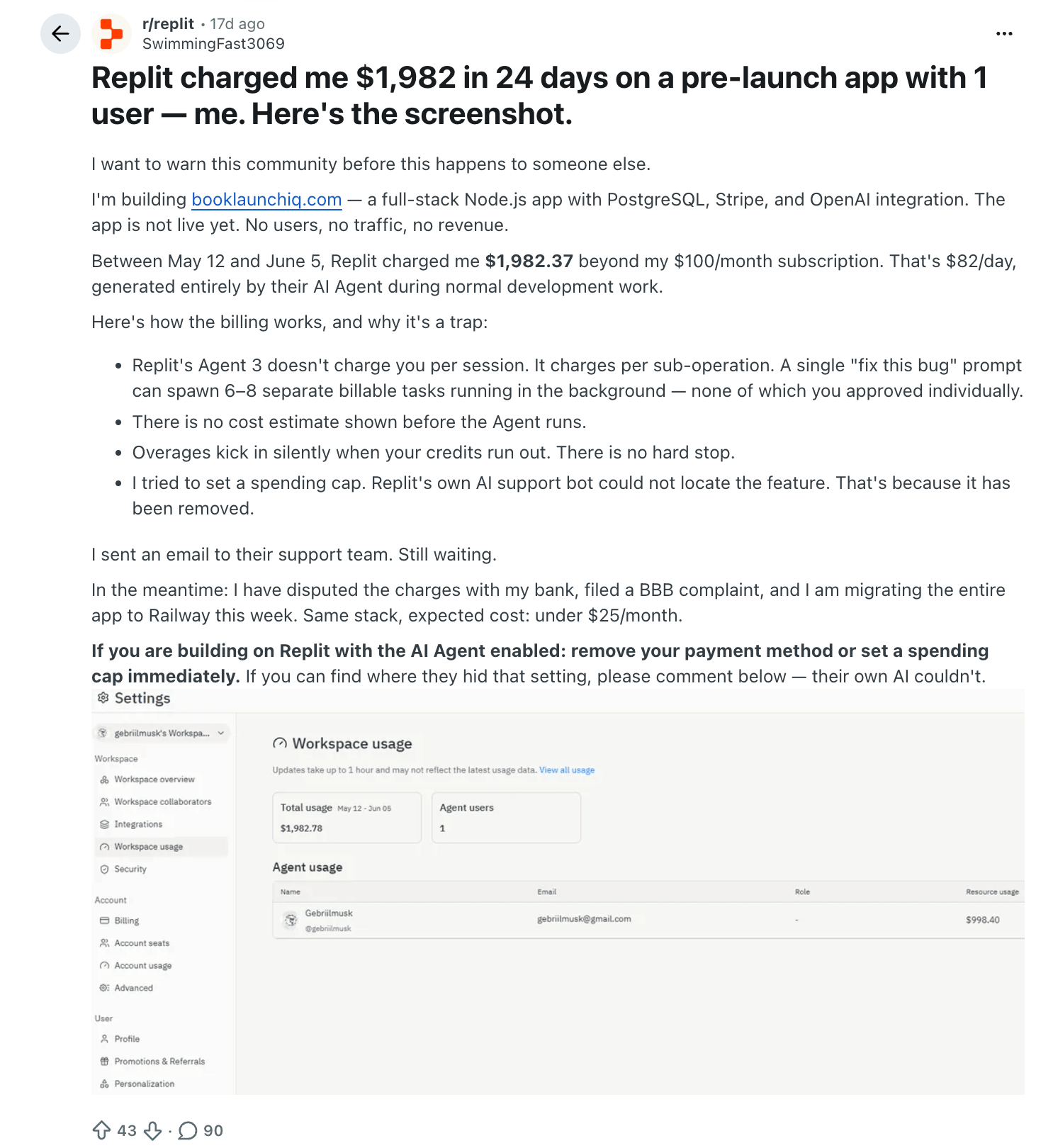
Some users say they don't always know what they’re spending their credits on until the costs have already added up. For example, another Redditor said Assistant edit requests were draining credits in a way that wasn’t obvious from the main interface.
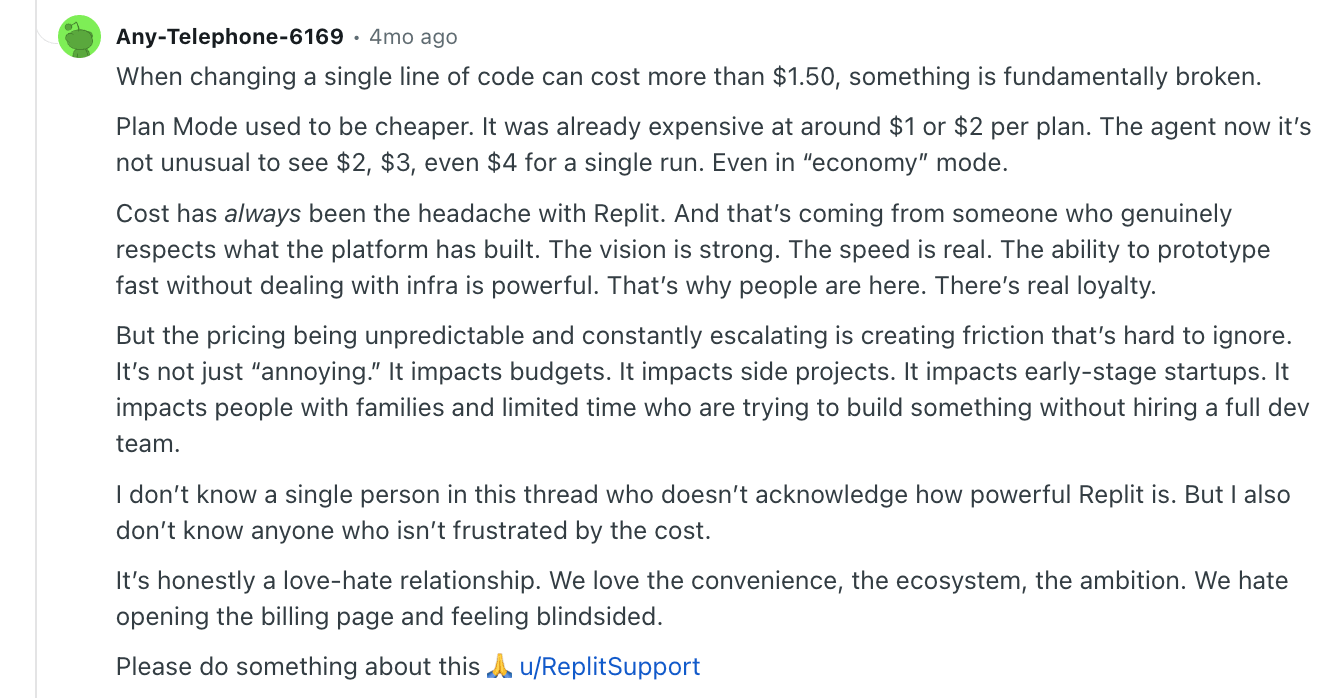
But the feedback isn't all negative. Users like that Replit is fast and lets them build and deploy apps from one place. One user called its ability to prototype without managing infrastructure “powerful,” but described the overall experience as a “love-hate relationship” because billing feels unpredictable.
What happens if you run out of credits?
First, the good news: your apps don't go offline. Anything you've already published stays live, and your data stays put.
But you can’t do any more work until you buy a credit pack, keep building on pay-as-you-go, or wait for credits to reset on your renewal date.
If you choose to ‘pay-as-you-go,' know that Replit keeps working and charges your card for the extra usage. Unless you've set a spending limit, there's nothing stopping the meter; that’s how some people end up with surprise bills.
Credit packs are the safer option. They start at $100, bigger packs get small discounts (for example, $1,000 in credits for $950), and they expire six months after purchase. But they have their own trap: if you're topping up every couple of weeks just to finish one project, your "real" monthly cost stops looking anything like the sticker price.
It’s also worth noting that what counts as "running out" depends on your plan. On Starter, your daily Agent credits refresh each day, so running out usually just means waiting until tomorrow. On Core and Pro, you're working from a monthly pool. Once it's gone, you can keep going in Free Mode until that allowance runs out, but paid work is pay-as-you-go or a top-up until your reset date.
Hidden costs to watch out for with Replit
Some Replit costs show up later. For instance, it's easy to assume that once your app is built and published, you're done paying. However, hosting draws from the same credits as the Agent, so an app that needs to actually run—with a backend or an always-on server—keeps burning credits after the build is done. Static sites are cheap, but a real working app isn't.
Your users' activity costs you, too. Once people start interacting with your app, visitor traffic creates bandwidth, compute, and database activity that all add to your bill. So, the more successful your app gets, the more expensive it can be to run.
Tips for lowering credit usage with Replit
Replit charges based on how much work the Agent does, so how you prompt and manage each session matters. A few good habits, drawn from Replit's own docs and hard-won user advice, can help your credits go further:
- Keep the Agent on a short leash. Use Plan Mode to shape the task before the Agent starts changing code. It still uses credits, but it can help you catch misunderstandings before heavier build work begins.
- Pick the cheaper mode for simple work. Start in Free Mode for everyday work, and switch to Power Mode when you need more. Save Max Mode for genuinely complex builds or debugging.
- Make small edits by hand. Simple text, color, spacing, or layout tweaks don't need the Agent. Doing them yourself saves your credits for the heavy lifting.
- Set a spending limit before a long session. On paid plans, you can set a usage limit and a service-shutdown limit so charges stop at your ceiling instead of running on pay-as-you-go.
- Use credit packs for short spikes, not as a habit. They help when you need extra to finish a sprint.
None of these tips make Replit cheap, but they could be the difference between a predictable bill and a surprise at the end of the month.
Which Replit plan should you choose?
Choose Starter if you want to test Replit Agent before paying. It’s best for learning, quick prototypes, small personal projects, and one temporary published app. Just know that daily Agent credits run out quickly, so you have to wait for the next reset.
Choose Core if you’ve outgrown Starter and want monthly credits, a Free Mode allowance, Full build, Plan Mode, Connectors, unlimited published apps, and no Replit badge. It’s best for solo builders or very small teams working on early-stage projects.
Choose Pro if Core feels too tight. You get a larger credit pool with higher tiers available, more Free Mode usage, up to 10 agents working in parallel, and two-month credit rollover. It’s best for small businesses, agencies, and startups that need to build faster.
Choose Enterprise if you’re rolling Replit out across a large company and need SSO, SCIM, audit logs, stronger admin controls, unlimited seats, dedicated support, private infrastructure options, invoice billing, or procurement-friendly terms.
Is Replit worth it?
Replit can be worth it if you want to build, test, and deploy prototypes quickly in one browser-based workspace, and if you're comfortable with usage-based pricing.
Consider Replit if you:
- Want to build prototypes, MVPs, or smaller apps quickly
- Don’t want to set up a local development environment
- Prefer building with an AI Agent instead of coding everything from scratch
- Want coding, databases, hosting, and deployment in one place
- Are willing to monitor credits, set spending limits, and guide the Agent carefully
Pass on Replit if you:
- Want predictable pricing that doesn’t change with usage
- Expect unlimited AI building after paying for a subscription
- Don’t want to track credits, hosting, bandwidth, or Agent usage
- Need enterprise security controls without moving to a custom plan
- Prefer more control over your codebase, infrastructure, and costs
- Rely heavily on Agent debugging and don’t want to pay for repeated fixes
Replit vs Softr pricing: Which is better?
Replit is built for developers and teams who want to build and ship fast with AI. But credits add up quickly, and you still have to review the code, fix bugs, deploy, and maintain the app. That works if you're technical or have a big budget.
But if you want to build and ship secure, ready-to-use business apps fast—without developer assistance or watching expenses climb every time you build—consider Softr.
The AI-native platform lets you build native databases and create custom apps on top of your data: client portals, CRMs, intranets, dashboards, and internal tools.
Just describe the tool you want, and Softr's AI Co-Builder generates the app, database, pages, workflows, permissions, and business logic for you. You can also build it from Claude or ChatGPT through the Softr MCP, which doesn’t use Softr AI credits. You also don't have to worry about the tricky parts of an app, like authentication, user permissions, data security, and hosting. It all comes built into your app from the start.
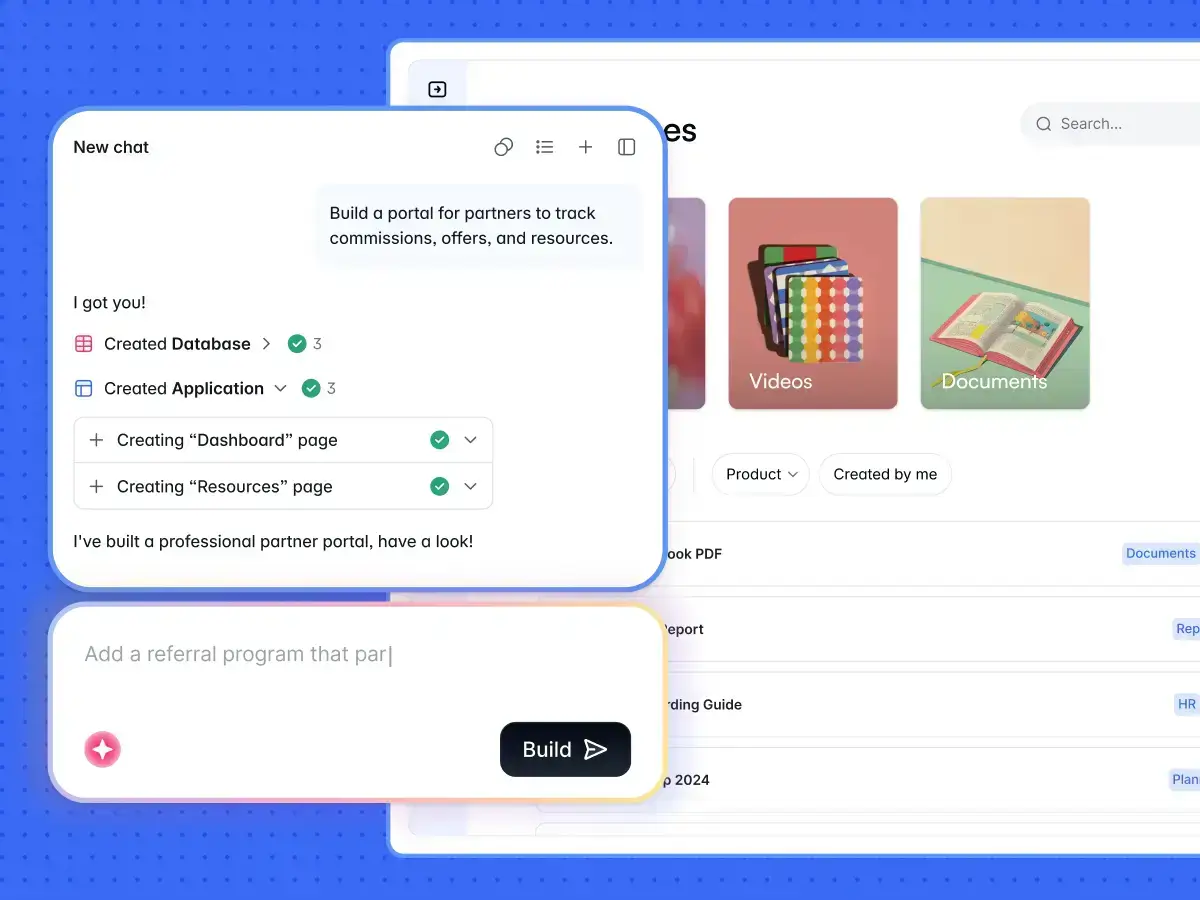
Once your app is built, make quick changes using the visual editor without spending AI credits: update pages, add features, adjust workflows or layouts, and manage users. If you have a developer on the team, they can also customize your app further with HTML, CSS, or JavaScript through the Custom Code block.
Or use the Vibe Coding block to generate custom UI elements from plain-language prompts, like custom dashboards, pricing calculators, a bulk file uploader, or an AI chatbot widget.
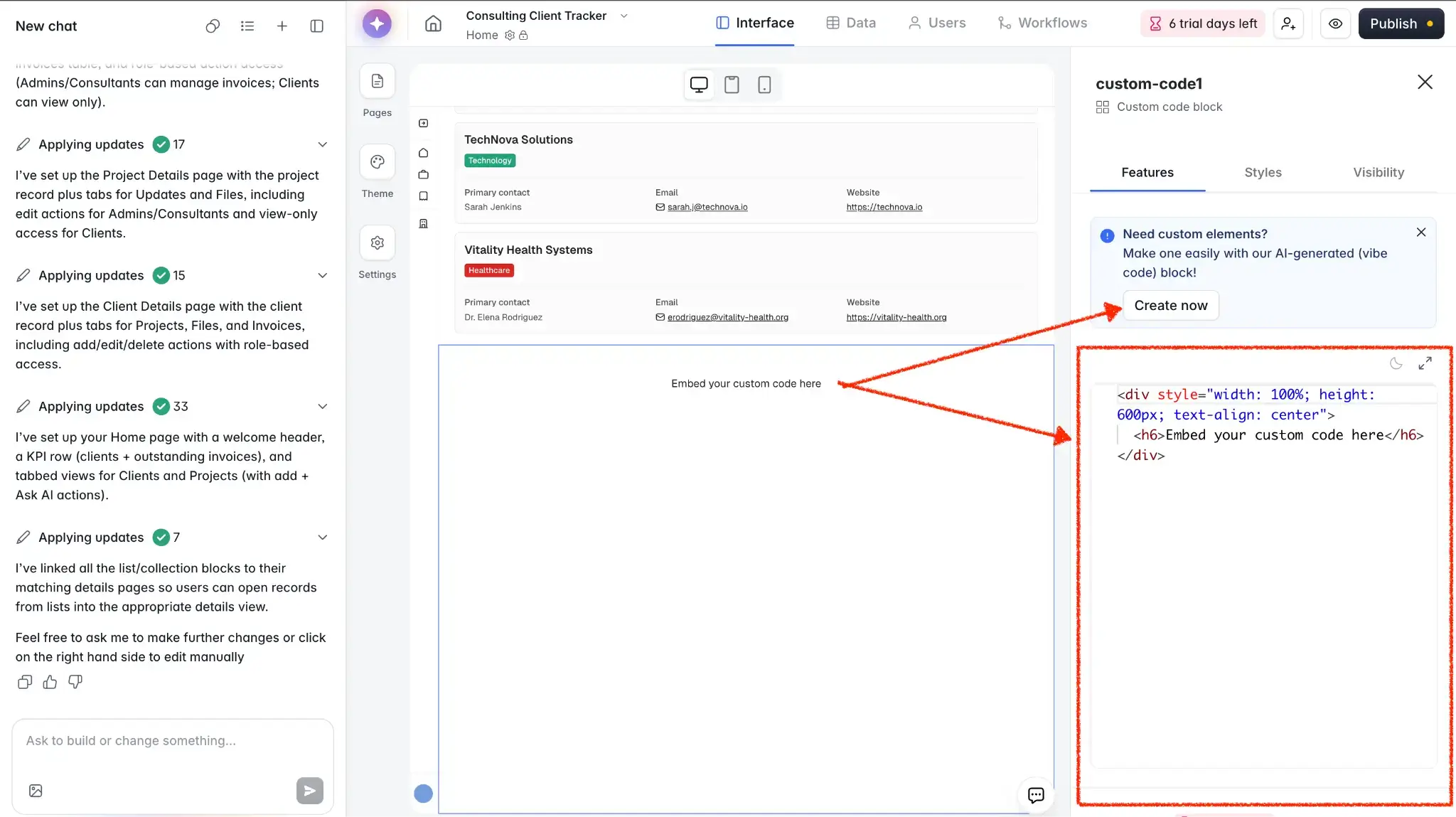
💡 See more vibe coding examples built in Softr.
With Softr, you get:
- Predictable, flat pricing. You pay a flat monthly rate that scales with how many records and users you have (so you know your cost upfront).
- Users included in every plan. Each Softr plan includes a set number of team and client app users, for example 10 team and 50 client users on Pro. Past that limit, extra app users start at $1/month on Pro, and extra builders cost $5 to $20/month each, depending on the plan.
- Logins and permissions, built in. Softr comes with secure logins, custom user groups, and granular permissions out of the box. So, you can build apps where different people see different things based on their permission level.
- A complete platform for app building. Where Replit gives you code to assemble and maintain, Softr combines an AI app builder with a native database and workflow automation. Start with Softr Databases, or connect 21+ external data sources you already use, like Airtable, Google Sheets, and Notion, to build and publish secure business apps.
Softr pricing overview
Replit vs Softr: Which should you choose?
I’ve used Softr to build apps for nearly three years now, and I recently tried Replit. From my experience and from what users are saying, here’s my final take.
Choose Replit if you:
- Want fast, AI-assisted coding and full control over the code itself
- Are comfortable reviewing, debugging, and maintaining what the Agent builds
- Are mostly building prototypes, MVPs, or developer-led projects
- Want coding, hosting, and deployment together in one browser-based workspace
- Have the technical skills (or budget) to manage usage-based costs
Choose Softr if you:
- Want to build secure, ready-to-use business apps without managing code
- Need portals, CRMs, dashboards, or internal tools real users can rely on from day one
- Prefer flat, predictable pricing over costs that move with every AI action
- Want built-in logins, permissions, workflows, and a database
- Have both technical and non-technical people who need to build and update apps
Editing an app manually in Replit means knowing how to code, while in Softr anyone on your team can update pages, workflows, and permissions without technical overhead. You save your AI credits for when you actually want AI to do the work, not for every small change along the way.
Try Softr for free and build your first production-ready business app with AI.
Frequently asked questions
Is Replit AI free or paid?
How does Replit pricing work?
How much is Replit per month?
Why is Replit so expensive?
What's the difference between Softr and Replit?